




- Posts: 3
- Thank you received: 0
Charts not showing the highest details on Android
- Ronang
- Topic Author
- Offline
- New Member
-

Less
More
8 months 6 days ago #3514
by Ronang
Charts not showing the highest details on Android was created by Ronang
Hey all,
I just imported some cm93 charts to a new android tablet, and despite the charts being the same as on my computer, I can access a much higher level of detail in my computer than in my tablet.
The android tablet is a Galaxy Tab S9 FE running on Android 16. I imported the charts using "open with" on the .zip, and redid the procedure in case it was coming from an extraction problem. Then I went to look at the extracted files, but they look similar as the ones in my computer. The level of details is the same in the settings on both devices. I also tried to change the DPI to see if it was coming from a screen resolution problem, but no change.
Any idea what could be wrong?
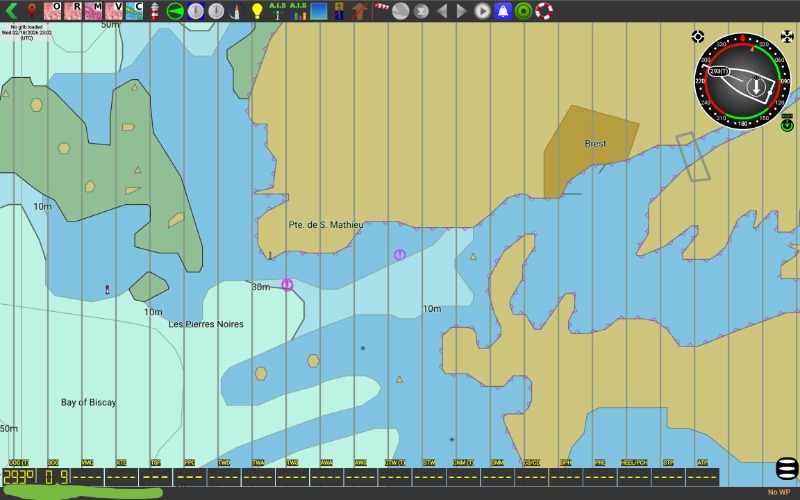
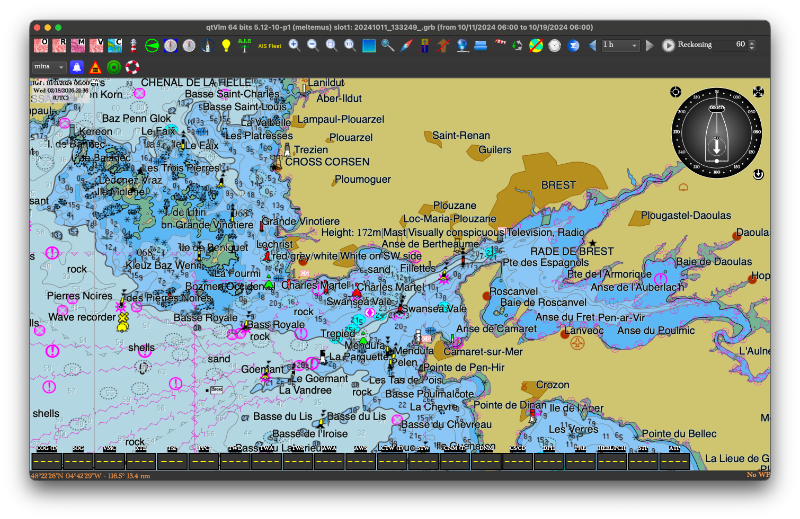
Attached are 2 screenshots, one from my tablet one from my computer. The chart folder is the same in both case.
Thank you!
I just imported some cm93 charts to a new android tablet, and despite the charts being the same as on my computer, I can access a much higher level of detail in my computer than in my tablet.
The android tablet is a Galaxy Tab S9 FE running on Android 16. I imported the charts using "open with" on the .zip, and redid the procedure in case it was coming from an extraction problem. Then I went to look at the extracted files, but they look similar as the ones in my computer. The level of details is the same in the settings on both devices. I also tried to change the DPI to see if it was coming from a screen resolution problem, but no change.
Any idea what could be wrong?
Attached are 2 screenshots, one from my tablet one from my computer. The chart folder is the same in both case.
Thank you!
Please Log in or Create an account to join the conversation.
- maitai
- Offline
- Administrator
-

Less
More
- Posts: 1356
- Thank you received: 38
8 months 6 days ago #3515
by maitai
Replied by maitai on topic Charts not showing the highest details on Android
There is no reason I can imagine, except if:
Not the same charts
Your charts settings are not the same, especially Display category.
Considering that your Android screenshot shows the "jail bars" (overzoom) and the other does not, I would say that your charts are not the same.
Not the same charts
Your charts settings are not the same, especially Display category.
Considering that your Android screenshot shows the "jail bars" (overzoom) and the other does not, I would say that your charts are not the same.
Please Log in or Create an account to join the conversation.
- Ronang
- Topic Author
- Offline
- New Member
-
Less
More
- Posts: 3
- Thank you received: 0
8 months 6 days ago #3516
by Ronang
Replied by Ronang on topic Charts not showing the highest details on Android
Thank you for you message!
I have fixed the problem now, it was coming from a compression issue on Mac. I was compressing the chart folder on my mac, transferring it to the tablet and opening it up with Qtvlm from there. So instead I transferred the uncompressed charts to the tablet, compress them with android, opened it again with Qtvlm and it worked 😊 I was using the default app from the mac to do the compressing, called unarchiver. So if someone has the same problem, try using sa different app on your mac, or do the procedure from android.
Thanks!
I have fixed the problem now, it was coming from a compression issue on Mac. I was compressing the chart folder on my mac, transferring it to the tablet and opening it up with Qtvlm from there. So instead I transferred the uncompressed charts to the tablet, compress them with android, opened it again with Qtvlm and it worked 😊 I was using the default app from the mac to do the compressing, called unarchiver. So if someone has the same problem, try using sa different app on your mac, or do the procedure from android.
Thanks!
Please Log in or Create an account to join the conversation.
- maitai
- Offline
- Administrator
-
Less
More
- Posts: 1356
- Thank you received: 38
8 months 6 days ago #3517
by maitai
Replied by maitai on topic Charts not showing the highest details on Android
Yes compressing on a mac gives some strange results sometimes, especially for very large archives. Another solution is to compress on a Windows or Linux machine.
Please Log in or Create an account to join the conversation.
Time to create page: 0.191 seconds